Thursday, December 10, 2009

T4

No, not that crappy movie but Text Template Transformation Toolkit.

I’ve played around with T4 every now and then over the last year but I’ve struggled to find any really good source for learning more. I guess the man who stands out from the crowd is Oleg Sych who has blogged about it en masse.

I’m watching a new screen cast by him on Channel 9 right now and it’s really good so please check it out.

Thursday, November 26, 2009

New configuration syntax for FakeItEasy

I’ve implemented a new, cleaner simpler, ninja-deluxe-shiny-gold-plated-ultra-cool way of configuring fakes/stubs/mocks in FakeItEasy.

The news are two fold:

  1. Simpler call specifications
  2. Simpler argument validations

How’s this for simple?

public void Example()
{
    var serviceProvider = A.Fake<IServiceProvider>();
    var service = A.Fake<IWidgetFactory>();

    A.CallTo(() => serviceProvider.GetService(typeof(IWidgetFactory))).Returns(service);
}

No need for awkward lambda expressions where you have to split the configured method from the object that it’s called on.

Instead of:

serviceProvider.CallsTo(x => x.GetService(typeof(IWidgetFactory))

This reads better:

A.CallTo(() => serviceProvider.GetService(typeof(IWidgetFactory)))

As I mentioned argument validation has also become simpler, I mean, this is just childs play isn’t it?

A.CallTo(() => serviceProvider.GetService(A<Type>.Ignored)).Throws(new Exception());
A.CallTo(() => serviceProvider.GetService(A<Type>.That.Matches(_ => _.Name.StartsWith("A")))).Throws(new Exception());

The really cool thing is that you can define your own extension methods that provides validations for arguments, these extension will show up on the “That”-property, like this:

A<Type>.That.IsValidatedByMyVeryOwnExtensionMethod();
A<Type>.That.IsInSystemNamespace();
A<string>.That.SpellsMyName();

It can be whatever you want, this means that you can effectively provide your own DSL for argument validation.

I’m thinking about providing an “An” class as well so that you can write the more grammatically correct “An<object>.Ignored” rather than “A<object>.Ignored”, but I’m not sure it’s worth it, maybe it’s confusing, what do you think?

I’ll be blogging about argument validations and how to provide your own extension super easy soon.

Technorati-taggar: ,,,,,

Saturday, November 7, 2009

Fix that bug will ya? NO!

If there’s a bug in software I’ve created my knee jerk reaction is that I created that bug. The knee jerk reaction of some developers is “there must be a bug in the framework”, which of course turns out to be false 99.9999% of the times.

Yesterday I managed to track down a bug that had eluded me for a couple of weeks; an object graph that we’re serializing to the Asp.Net session (using state server) sometimes couldn’t be serialized. Every class that could possibly be contained in the graph was marked as serializable and also the error message wasn’t the one you get when you have a value that isn’t serializable in the graph. What I found was the following, we have classes similar to this:

public interface IPredicate
{
    bool Evaluate(object value);
}

[Serializable]
public class AtLeastPredicate
    : IPredicate
{
    private IComparable lowerBound;

    public AtLeastPredicate(IComparable lowerBound)
    {
        this.lowerBound = lowerBound;
    }

    public bool Evaluate(object value)
    {
        return this.lowerBound.CompareTo(value) <= 0;
    }
}

You’d think that you’d be able to serialize instances of the AtLeastPredicate-type right? As long as the “lowerBound” value it self is serializable you say. Yup, that should be it I say.

Let’s try that:

public class Program
{
    public static void Main(string[] arguments)
    {
        var atLeastString = new AtLeastPredicate("bar");
        atLeastString = SerializeAndDeserialize(atLeastString);

        Debug.Assert(atLeastString.Evaluate("foo"));
    }

    public static T SerializeAndDeserialize<T>(T value)
    {
        var formatter = new BinaryFormatter();

        using (var stream = new MemoryStream())
        {
            formatter.Serialize(stream, value);

            stream.Seek(0, SeekOrigin.Begin);

            return (T)formatter.Deserialize(stream);
        }
    }
}

Yup, works like a charm as it should. So… What’s the problem? Well, let’s try that again:

public class Program
{
    public static void Main(string[] arguments)
    {
        var atLeastInt = new AtLeastPredicate(5);
        atLeastInt = SerializeAndDeserialize(atLeastInt);

        Debug.Assert(atLeastInt.Evaluate(10));
    }

    public static T SerializeAndDeserialize<T>(T value)
    {
        var formatter = new BinaryFormatter();

        using (var stream = new MemoryStream())
        {
            formatter.Serialize(stream, value);

            stream.Seek(0, SeekOrigin.Begin);
            
            return (T)formatter.Deserialize(stream);
        }
    }
}

Not much difference there, we’ve changed from comparing strings to comparing ints, and of course ints are serializable too so there should be no problem. But there is, this code will fail:
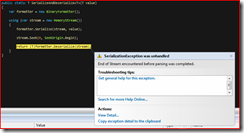
image

Turns out that this is a bug in the .net framework:

 http://connect.microsoft.com/VisualStudio/feedback/ViewFeedback.aspx?FeedbackID=91177 

Oh, well, I’ve created my share of bugs in my life so who am I to blame MS for doing that every once in a while. What I don’t get though is that this bug will not be fixed, I can’t really come up with a scenario where fixing this is a breaking change. Now, for sure, me not being able to come up with such a scenario doesn’t mean it doesn’t exist.

I created an easy workaround for this however and since I was going to use it in a couple of places I encapsulated it in a class of its own:

[Serializable]
public class SerializableComparableField
    : IComparable
{
    private object valueField;

    public SerializableComparableField(IComparable value)
    {
        this.Value = value;
    }

    public IComparable Value
    {
        get
        {
            return (IComparable)this.valueField;
        }
        set
        {
            this.valueField = value;
        }
    }

    public int CompareTo(object obj)
    {
        return this.Value.CompareTo(obj);
    }
}

Using this class in the AtLeastPredicate and anywhere else we need a field continaing IComparables that should be serializable.

[Serializable]
public class AtLeastPredicate
    : IPredicate
{
    private SerializableComparableField lowerBound;

    public AtLeastPredicate(IComparable lowerBound)
    {
        this.lowerBound = new SerializableComparableField(lowerBound);
    }

    public bool Evaluate(object value)
    {
        return this.lowerBound.CompareTo(value) <= 0;
    }
}

Sunday, November 1, 2009

Configuring fake objects on a global scale

In this post I’ll describe a way that lets you specify default configurations for specific types so that any time a fake of that type is created this default configuration will be applied.

In FakeItEasy there’s a concept called a fake object container represented by the interface IFakeObjectContainer which has two methods, one for resolving/creating fakes and one for configuring fakes, in this post I’m going to focus on the configuration part.

namespace FakeItEasy.Api
{
    using System;
    using System.Collections.Generic;

    /// <summary>
    /// A container that can create fake objects.
    /// </summary>
    public interface IFakeObjectContainer
    {
        /// <summary>
        /// Creates a fake object of the specified type using the specified arguments if it's
        /// supported by the container, returns a value indicating if it's supported or not.
        /// </summary>
        /// <param name="typeOfFakeObject">The type of fake object to create.</param>
        /// <param name="arguments">Arguments for the fake object.</param>
        /// <param name="fakeObject">The fake object that was created if the method returns true.</param>
        /// <returns>True if a fake object can be created.</returns>
        bool TryCreateFakeObject(Type typeOfFakeObject, IEnumerable<object> arguments, out object fakeObject);

        /// <summary>
        /// Applies base configuration to a fake object.
        /// </summary>
        /// <param name="typeOfFakeObject">The type the fake object represents.</param>
        /// <param name="fakeObject">The fake object to configure.</param>
        void ConfigureFake(Type typeOfFakeObject, object fakeObject);
    }
}

Using the scoping feature you can actually plug in your own container for a given scope like this:

using (Fake.CreateScope(new MyOwnContainer()))
{ 
    
}

This means that within this scope your container will be used. Let’s focus on the ConfigureFake-method. This method will be called ANY time a fake object is created by FakeItEasy and lets us hook into the creation process and apply configuration to the generated fake object. This provides an easy way of defining default configuration for fakes of certain types which allows you to in your tests focus on configuring the values that are significant to the test.

At the moment the default container is a class called NullFakeObjectContainer, which I’m sure you can guess does exactly nothing. However, there is an assembly distributed in the latest versions named FakeItEasy.Mef.dll. If you in your test-project adds a reference to this assembly FakeItEasy will automatically pick this up and use the MefContainer as the default container. And this is where the fun begins.

The MEF assembly exposes two types that are significant to this feature, the most important one being IFakeConfigurator and the most used one being FakeConfigurator<T>.

namespace FakeItEasy.Mef
{
    using System;
    using System.ComponentModel.Composition;

    /// <summary>
    /// Provides configurations for fake objects of a specific type.
    /// </summary>
    [InheritedExport(typeof(IFakeConfigurator))]
    public interface IFakeConfigurator
    {
        /// <summary>
        /// The type the instance provides configuration for.
        /// </summary>
        Type ForType { get; }

        /// <summary>
        /// Applies the configuration for the specified fake object.
        /// </summary>
        /// <param name="fakeObject">The fake object to configure.</param>
        void ConfigureFake(object fakeObject);
    }
}

As you see this interface is tagged with the InheritedExportAttribute from MEF, which means that when you implement this interface in a type that type is automatically exported.

As I said the most used one is probably FakeConfigurator<T> which is a base implementation of this interface that lets you implement it very easily. Let’s say for example that you want to provide a common configuration for the HttpRequestBase type, all you do is create a class that inherits FakeConfigurator<HttpRequestBase> and by magic this is exported by MEF and included in the default container.

public class RequestConfiguration
    : FakeConfigurator<HttpRequestBase>
{
    public override void ConfigureFake(HttpRequestBase fakeObject)
    {
        Configure.Fake(fakeObject)
            .CallsTo(x => x.Form)
            .Returns(new NameValueCollection());

        Configure.Fake(fakeObject)
            .CallsTo(x => x.UserAgent)
            .Returns("Mozilla/5.0 (Windows; U; Windows NT 5.1; de; rv:1.9.0.13) Gecko/2009073022 Firefox/3.0.13");

        Configure.Fake(fakeObject)
            .CallsTo(x => x.ContentEncoding)
            .Returns(Encoding.UTF8);

        Configure.Fake(fakeObject)
            .CallsTo(x => x.Url)
            .Returns(new Uri("http://foo.com/"));

        Configure.Fake(fakeObject)
            .CallsTo(x => x.RawUrl)
            .Returns(x => ((HttpRequestBase)x.FakedObject).Url.AbsoluteUri);

        Configure.Fake(fakeObject)
            .CallsTo(x => x.UrlReferrer)
            .Returns(new Uri("http://bar.com/"));
    }
}

Now any time you create a faked HttpRequestBase it will automatically be configured with this default configuration and you will only have to override this default configuration with specific values you need for your tests.

[TestFixture]
public class Tests
{

    [Test]
    public void Test_something_that_is_dependent_on_the_UserAgent()
    {
        var request = A.Fake<HttpRequestBase>();

        Console.Write(request.UserAgent); // Will print "Mozilla/5.0 (Windows; U; Windows NT 5.1; de; rv:1.9.0.13) Gecko/2009073022 Firefox/3.0.13"

        Configure.Fake(request)
            .CallsTo(x => x.UserAgent)
            .Returns("some other agent");

        Console.Write(request.UserAgent); // Will print "some other agent"
    }
}

Saturday, October 24, 2009

Asserting on exception messages in NUnit

It seems to me that a lot of developers has missed the fact that Assert.Throws<T> in NUnit actually returns the thrown exception which lets you assert on the message (and other properties of the exception). I wrote a response to a question on Stack Overflow which talks about this:

http://stackoverflow.com/questions/1609536/nunit-assert-throws

Saturday, September 5, 2009

Fake scopes explained

FakeItEasy has a scoping feature that lets you configure calls only within a scope or asserting that calls was made within a specific scope.

A scope implements IDisposable and the Dispose method closes the scope, this means that to create a scope you create a using statement for it:

using (Fake.CreateScope())
{
    // Do something within the scope...
}

Any calls configured within a scope are only valid within that scope, this means that you can override the behavior of a faked method for just a small part of your test, for example:

public void Configuring_calls_in_scope()
{
    var factory = A.Fake<IWidgetFactory>();

    factory.Configure().CallsTo(x => x.Create()).Returns(A.Fake<IWidget>());

    using (Fake.CreateScope())
    {
        factory.Configure().CallsTo(x => x.Create()).Throws(new Exception());

        // This will throw since the method was configured in this scope.
        factory.Create();
    }

    // This will return a fake widget as configured before entering the scope.
    var widget = factory.Create();
}

Scopes also affects what calls are visible when getting the calls made to a fake object, when you’re inside a child scope and use the Fake.GetCalls(foo)-method or the RecordedCalls-property on a Fake<T>-object only the calls made within that scope are visible. In an outer scope the calls made in the outer scope and any child scope are visible:

public void Getting_calls_in_scope()
{
    var factory = A.Fake<IWidgetFactory>();

    factory.Configure().CallsTo(x => x.Create()).Returns(A.Fake<IWidget>());

    var widget = factory.Create();

    // This will succeed since there was a call to the create method
    // in the current scope.
    Fake.Assert(factory).WasCalled(x => x.Create());

    using (Fake.CreateScope())
    {
        // This will produce 0, no calls were made to the create method 
        // in the current scope.
        int numberOfCalls = Fake.GetCalls(factory).Matching(x => x.Create());

        // This will throw:
        Fake.Assert(factory).WasCalled(x => x.Create());
    }

    using (Fake.CreateScope())
    {
        factory.Create();
    }

    // This will now return 2 since there was one call in the outer scope
    // and another one in the inner scope.
    int numberOfCalls = Fake.GetCalls(factory).Matching(x => x.Create());
}

The other way of faking it

I’ve added a new way to create fake objects in FakeItEasy. You might call the “traditional” way of doing it in FakeItEasy is the “Rhino-style”:

public static void TraditionalWay()
{
    var foo = A.Fake<IFoo>();
    foo.Configure().CallsTo(x => x.Baz()).Returns(10);

    int value = foo.Baz();

    Fake.Assert(foo).WasCalled(x => x.Baz());
}

When creating fakes in this way the returned faked object is of the type specified in the A.Fake-call, faking an IFoo returns an IFoo. When creating a fake the new way, which we might call the “Moq-style” you instead create a fake object that provides an api for configuring the faked object as well as a reference to the faked object:

public static void TheOtherWay()
{
    var foo = new Fake<IFoo>();
    foo.CallsTo(x => x.Baz()).Returns(10);

    int value = foo.FakedObject.Baz();

    foo.Assert().WasCalled(x => x.Baz());
}

Both styles are equally supported so that the developer can choose what ever style he/she is most comfortable with.